Element alignment#
Aligning a use case and an actor#
In a usecase diagram, cases and actors have different width and height. For a graphical purpose, you may want to align them horizontally or vertically. Let’s take the following example:
\umlactor{A}
\umlactor[x=-2, y=-3]{B}
\umlusecase[x=2, y=-3]{C}
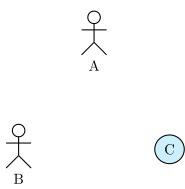
The y coordinate defines the center of the case or actor node. It will be better in this example to have actor B and case C top-aligned. A solution is to define manually the y value for C, but it is not very convenient. You may prefer use the anchor option. If you specify anchor=north, the y coordinate will define the top center anchor of the node, instead of the center. You may take a look at the differences between both codes.
\umlactor{A}
\umlactor[x=-2, y=-2, anchor=north]{B}
\umlusecase[x=2, y=-2, anchor=north]{C}
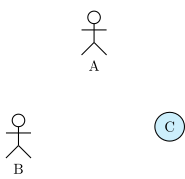
You can notice there is still mis-alignment. It is because an actor node is elliptical and hidden.
Similarly, you may use anchor=east to right align classes, anchor=west to left align classes or anchor=south to bottom align classes.