Environment umlstate#
A “standard” state can be defined with the umlstate environment:
\begin{umlstate}[x=0, y=0, name=state]{state}

\end{umlstate}


Both options x and y allows you to place the state in the figure, or in another state.
The default value is 0. The argument to give is the label of the state. The node representing the state has a default name, based on a global counter.
For practical reasons, when you define a transition for instance, you can rename it with the name option.
You can also define the width of an empty state with the width option (8ex by default).
If you want to define a state without detailing it, you can use the umlbasicstate command, that is an alias of the umlstate environment.
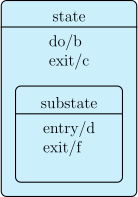
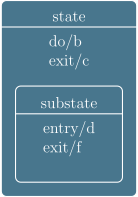
You can also give actions on a state, through the entry, do and exit options:
\begin{umlstate}[name=state, do=b, exit=c]{state}
\begin{umlstate}[name=substate, entry=d, exit=f]{substate}
\end{umlstate}
\end{umlstate}