Command \umlNarynode#
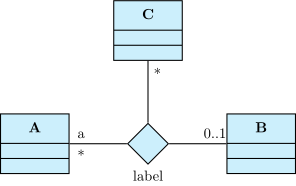
Sometimes, you need to draw a relation between more than two classes, namely an n-ary association. To do so, you have to draw the main node of such a relation, and link it to every class it has to be linked:
\umlemptyclass{A}
\umlemptyclass[x=6]{B}
\umlemptyclass[x=3, y=3]{C}
\umlNarynode[x=3, name=naryassoc, below]{label}
\umlassociate[attr1=a|*]{A}{naryassoc}
\umlassociate[mult1=0..1]{B}{naryassoc}
\umlassociate[mult=*]{naryassoc}{C}
The \umlNarynode command accepts the following options:
width-
to set the width of the node
name-
to give a name to the node and use it in others macros
-
below,below left,left,above left,above,above right,right,below right -
to place the label of the n-ary node. Contrary to their equivalents in TikZ-UML, these options has to be used without values. The default is above.
Warning
To use advanced positioning, do not forget to load TikZ library positioning