Local styles#
About colors#
draw, fill, text and possibly color options allow specifying the colors of an element, as for any TikZ node. The draw option specifies the color of the border, the fill option specifies the color of the background, and the text option specifies the color of the text inside the element. The color option is a shortcut for draw and fill options when it makes sense.
About thickness#
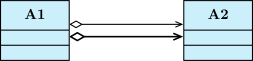
On a relation, you can use every TikZ-UML option, thickness options for instance:
\umlemptyclass{A1}
\umlemptyclass[right=3cm of A1]{A2}
\umluniaggregate[anchors=10 and 170]{A1}{A2}
\umluniaggregate[anchors=-10 and -170, very thick]{A1}{A2}
Other styles#
If you want to set other TikZ styles, you can use the style option. It takes a comma separated list of TikZ styles.