Use-case diagrams#
Use-case diagrams are a way to represent the interactions between actors and use-cases in a system. They are useful for visualizing the requirements and functionalities of a system from an external perspective.
In such diagrams, you will find:
use-cases: see Command \umlusecase for more details
actors: see Command \umlactor for more details
systems: see Environment umlsystem for more details
relationships between use-cases and/or actors: see Definition of relationships for more details
notes: see Command \umlnote for more details
Advanced options for actors#
You can change dimensions of the actor symbol with the scale option. It also adapts position of the label below:
\umlactor{normal user}
\umlactor[x=2, scale=0.5]{small user}
\umlactor[x=4, scale=2]{big user}
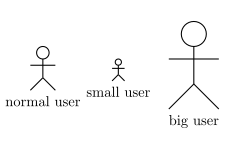

The actor symbol size is defined according to the font size (ex unit), whereas the distance between the symbol and the label is in cm. You can adjust it if you need with the below option (0.5cm by default).
\tikzumlset{font=\tiny}
\umlactor{normal user}
\umlactor[x=2, scale=0.5, below=0.1cm]{small user}
\umlactor[x=4, scale=2]{big user}
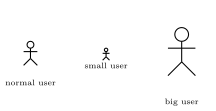

Every TikZ option dedicated to nodes can be used here, see Positioning elements for details.