Command \umlobject#
In a sequence diagram, a “standard” object can be defined with the \umlobject command:
\begin{umlseqdiag}
\umlobject{a}
\end{umlseqdiag}


Both options x and y allows you to place the object in the figure.
The default value of the
yoption is 0, that means the default placement of an object is at the top of the sequence diagram.The default value of the
xoption is the product of 4 by the value of the global counter identifying the object: for instance, for the second object defined in a diagram, thexoption is set to 8 by default, …
Unless the width of the object is too large, a shift of 4 is enough. If not, you use the {tt x} option.
The argument to give is the name of the object (if the object is a class instance, this is the name of the variable).
The node representing the state has a default name, based on a global counter. For practical reasons, when you define a message for instance, you can rename it with the name option.
Stereotype of an object#
The default stereotype of an object is class, meaning that the object is a class instance. In this case, the object is drawn as a rectangle containing the object name followed by the resolution operator ::. Yan can set the class type of the object with the class key (empty by default).
\begin{umlseqdiag}
\umlobject[class=A]{a}
\end{umlseqdiag}


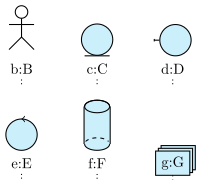
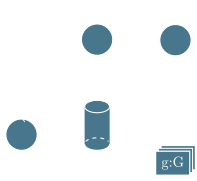
The stereo key allows you to set the stereotype of an object. It needs one of the following values: object (default value), actor, entity, boundary, control, database, multi. The last six are drawn in the following picture, from left to right and top to bottom:
\begin{umlseqdiag}
\umlactor[class=B]{b}
\umlentity[x=2, class=C]{c}
\umlboundary[x=4, class=D]{d}
\umlcontrol[x=0, y=-2.5, class=E]{e}
\umldatabase[x=2, y=-2.5, class=F]{f}
\umlmulti[x=4, y=-2.5, class=G]{g}
\end{umlseqdiag}
UML objects may be used in other contexts than class instances. Then, the colon symbol shown in an object may not be necessary. For this purpose, you may use the \umlbasicobject command.
To scale an object#
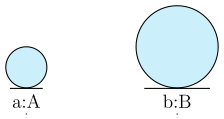
The scale option of the umlobject command allows you to scale an object, its symbol and its font size:
\begin{umlseqdiag}
\umlobject[class=A, stereo=entity]{a}
\umlobject[x=4, scale=2, class=B, stereo=entity]{b}
\end{umlseqdiag}
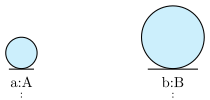

\tikzumlset{font=\large}
\begin{umlseqdiag}
\umlobject[class=A, stereo=entity]{a}
\umlobject[x=4, scale=2, class=B, stereo=entity]{b}
\end{umlseqdiag}