Environments and commands for calls#
Function calls are the core of sequence diagrams. Then, we need an engine either smart enough to propose a satisfying default behavior, either easy enough to parametrize.
Motivation#
From a technical point of view, there are two ways to implement function calls:
Either we use the nodal matrix structure of TikZ. The advantage is to work on a precomputed nodal grid and then to place elements of a sequence diagram easily (and fast for compilation) with exactly one counter.
Either we use an automatic positioning of nodes with a set of coordinates, here, the time instant, that allows total freedom for the user and make its work easier.
I chose the second way, to keep the philosophy used to implement the other diagrams in this package. Indeed, if the lack of a grid needs a more accurate computation core, and as a result more compilation time, you can define most of the elements very easily, such as constructor calls, drawn according to the standard. That is different from others UML software products I used before.
Environment umlcall#
You can define a function call with the umlcall environment. Of course, you can define umlcall environments inside other ones:
\begin{umlseqdiag}
\umlobject[class=A]{a}
\umlobject[class=B]{b}
\umlobject[class=C]{c}
\begin{umlcall}{a}{b}
\begin{umlcall}{b}{c}
\end{umlcall}
\end{umlcall}
\end{umlseqdiag}
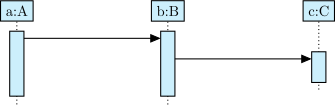
You have to give the name of the source object and the name of the destination object.
Operation name and arguments#
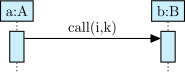
You can give the function name in a call and its arguments with the op option:
\begin{umlseqdiag}
\umlobject[class=A]{a}
\umlobject[class=B]{b}
\begin{umlcall}[op={call(i,k)}]{a}{b}
\end{umlcall}
\end{umlseqdiag}
Caution
Beware of the braces, so that the comma between i and k is deactivated as an option delimiter. Without them, there will be a compilation error.
Operation and return values#
You can also set the return value with the return option, with the same warning:
\begin{umlseqdiag}
\umlobject[class=A]{a}
\umlobject[class=B]{b}
\begin{umlcall}[op={call(i,k)}, return=2]{a}{b}
\end{umlcall}
\end{umlseqdiag}
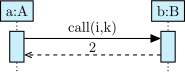
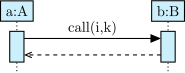
In this case, the return arrow is drawn with the return value above. You can draw the return arrow without giving a return value. For this, there is the with return option:
\begin{umlseqdiag}
\umlobject[class=A]{a}
\umlobject[class=B]{b}
\begin{umlcall}[op={call(i,k)}, with return]{a}{b}
\end{umlcall}
\end{umlseqdiag}
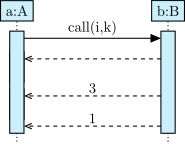
In some cases, the call may have multiple return arrows. To draw an additional return arrow, you can use the \umlreturn command:
\begin{umlseqdiag}
\umlobject[class=A]{a}
\umlobject[class=B]{b}
\begin{umlcall}[op={call(i,k)}, return=1]{a}{b}
\umlreturn{b}{a}
\umlreturn[return=3]{b}{a}
\end{umlcall}
\end{umlseqdiag}
Synchron / asynchron calls#
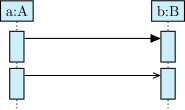
The type option allows you to tell if the call is synchron (default value) or asynchron:
\begin{umlseqdiag}
\umlobject[class=A]{a}
\umlobject[class=B]{b}
\begin{umlcall}[type=synchron]{a}{b}
\end{umlcall}
\begin{umlcall}[type=asynchron]{a}{b}
\end{umlcall}
\end{umlseqdiag}
Recursive calls#
If you give the same name as source and destination, you define a recursive call. In this case, you may prefer use an alias, the umlcallself environment:
\begin{umlseqdiag}
\umlobject[class=A]{a}
\umlobject[class=B]{b}
\begin{umlcall}{a}{b}
\begin{umlcall}{b}{b}
\end{umlcall}
\begin{umlcallself}{b}
\end{umlcallself}
\end{umlcall}
\end{umlseqdiag}
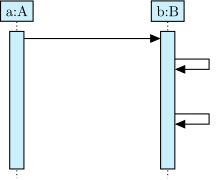
Of course, you can define umlcallself inside umlcallself and umlcall:
\begin{umlseqdiag}
\umlobject[class=A]{a}
\umlobject[class=B]{b}
\begin{umlcall}{a}{b}
\begin{umlcallself}[op=c1, return=0]{b}
\begin{umlcallself}[op=c2, return=true]{b}
\end{umlcallself}
\end{umlcallself}
\end{umlcall}
\end{umlseqdiag}
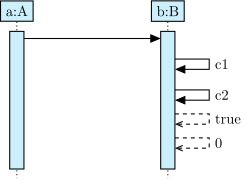
You also have recursive returns with the \umlreturnself command.
To place a call#
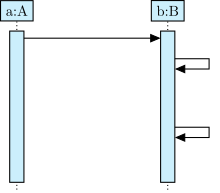
The dt option allows you to place a function call on a lifeline, relatively to the last call drawn on this lifeline. It has no default value. Its unit is ex. The default behavior is to shift the call you define to avoid overwriting between to consecutive calls:
\begin{umlseqdiag}
\umlobject[class=A]{a}
\umlobject[class=B]{b}
\begin{umlcall}{a}{b}
\begin{umlcall}{b}{b}
\end{umlcall}
\begin{umlcallself}[dt=5]{b}
\end{umlcallself}
\end{umlcall}
\end{umlseqdiag}
Caution
Do not forget that using option dt means relatively to the last call defines on the lifeline.
\begin{umlseqdiag}
\umlactor{A}
\umlactor{B}
\umlobject{C}
\begin{umlcall}{A}{C}
\begin{umlcall}{C}{A}
\end{umlcall}
\begin{umlcall}{B}{C}
\begin{umlcall}{C}{B}
\end{umlcall}
\begin{umlcall}[return=1]{B}{C}
\end{umlcall}
\end{umlcall}
\begin{umlcall}[dt=20, return=1]{A}{C}
\end{umlcall}
\end{umlcall}
\end{umlseqdiag}
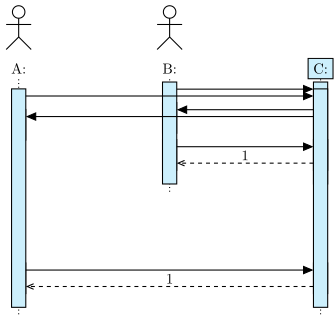
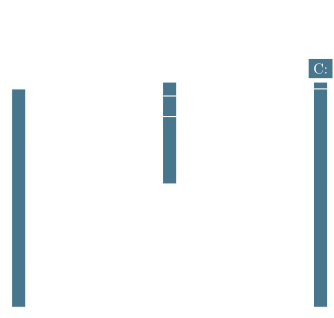
Both calls between B and C are first ones, so they are drawn on top of the lifeline. However, you want them to be drawn below the first call between A and C. By using option dt, you can do it:
\begin{umlseqdiag}
\umlactor{A}
\umlactor{B}
\umlobject{C}
\begin{umlcall}{A}{C}
\begin{umlcall}{C}{A}
\end{umlcall}
\begin{umlcall}[dt=10]{B}{C}
\begin{umlcall}{C}{B}
\end{umlcall}
\begin{umlcall}[return=1]{B}{C}
\end{umlcall}
\end{umlcall}
\begin{umlcall}[dt=20, return=1]{A}{C}
\end{umlcall}
\end{umlcall}
\end{umlseqdiag}
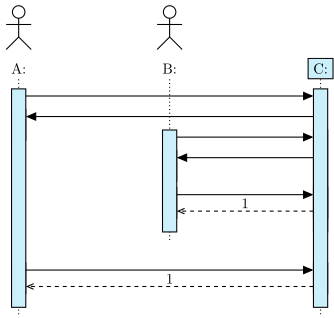
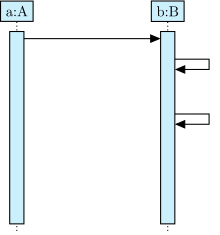
You can also set spaces for recursive calls with the padding option. It set the space just below the recursive call:
\begin{umlseqdiag}
\umlobject[class=A]{a}
\umlobject[class=B]{b}
\begin{umlcall}[padding=10]{a}{b}
\begin{umlcall}{b}{b}
\end{umlcall}
\begin{umlcallself}{b}
\end{umlcallself}
\end{umlcall}
\end{umlseqdiag}
Hint
padding can also take negative values, to fix for instance position of a call too far away for the previous one.
Command \umlconstructorcall#
Constructor calls are special function calls, insofar as they build a new object. They are not messages between two lifelines, but between a lifeline and an object.
To define a constructor call, you can use the \umlconstructorcall command:
\begin{umlseqdiag}
\umlobject[class=A]{a}
\umlconstructorcall[class=B]{a}{b}
\begin{umlcall}[op={call(i,k)}, return=2]{a}{b}
\end{umlcall}
\end{umlseqdiag}
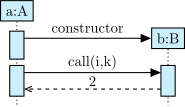
You can notice that everything behaves normally after a constructor call.
As an object builder, the \umlconstructorcall command has class, stereo and x options. As a function call, it has dt and op options.
Deprecated since version v2.0: The former command \umlcreatecall is now deprecated and should be replaced by \umlconstructorcall