User guide#
I am a software developer in a laboratory since 2010, and my work was (and still is) to develop a new numerical library from 2 or 3 existing competing ones that the laboratory wanted to merge. So my first task was some reverse engineering, to understand the structure of parent libraries, and to design the structure of the new library. So, I needed to draw UML diagrams. I couldn’t find a free tool (I tried nearly 10 of them) that could help me draw the first class diagram I wanted to create on one page of A4 paper! To succeed in drawing this diagram, I needed to change font sizes, to draw relationships with a complicated geometry (polylines with 3 segments for instance) or relationships that were not available at the time, …
Relying on LaTeX for everything I write and in particular on TikZ package for everything I draw, I tried to draw this diagram. Quickly, I realized that the best way was to develop my own package, in front of the apparent lack of dedicated packages to UML diagrams, except to one specific diagram, such as pgf-umlcd (for class diagrams) and pgf-umlsd (for sequence diagrams). Next to them, there was pst-uml package, that was developed for similar reasons in PSTricks … by one of my colleagues! TikZ-UML package was born.
Here is an example of class diagram you can draw:
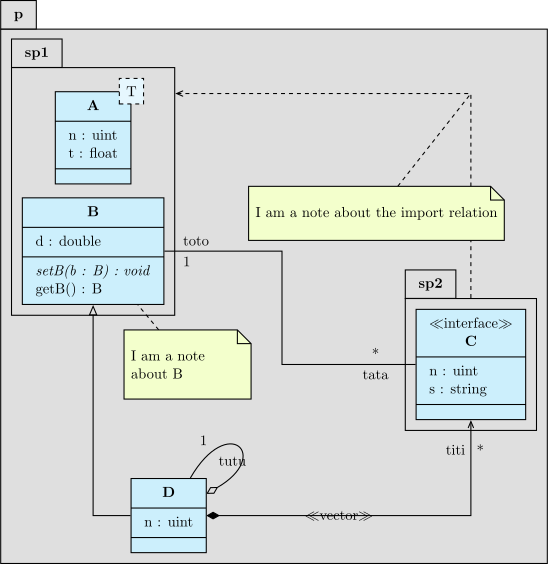
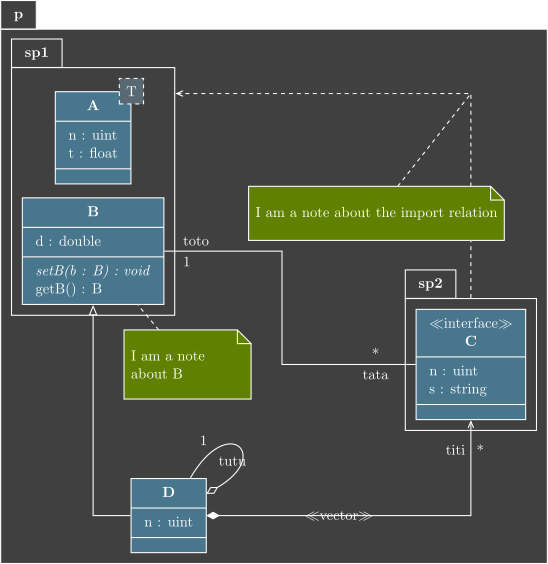
I wanted a syntax close to UML taxonomy, but with key-values as in TikZ package and I wanted to reproduce features of pst-uml package. That’s for the roadmap.
Actually, the package contains definitions of complete class diagrams, use case diagrams, sequence diagrams, state diagrams and component diagrams in a quite easy way. Even if TikZ-UML was not on CTAN, I was contacted by users and I had some feedbacks. On the other hand, I had to host documentation website on another server, and decided to change the documentation tool to Sphinx (and in particular its TikZ extension), as for other websites I maintain, and I took the opportunity to rework the documentation and improve the package, in particular about style settings to manage light and dark themes. Some improvements are still needed, but it is near the final release. One day, I hope TikZ-UML will be written in LaTeX3 and will be released on CTAN, but you have now a self-hosted GitLab repository.
In a UML diagram, you can find different types of objects: elements (such as a class, a component, …) and relationships between them (such as inheritance, composition, delegation, …).
The first part of this user guide will be dedicated to describing the different elements and the way to draw them. The second part will be dedicated to describing the relationships commands. The third part will be dedicated to describing the common settings, generally available for every of these elements and relationships. For more specific information about these elements and relationships, please refer to the documentation of the corresponding UML diagram in the fourth part.