TikZ-UML basics#
Naming elements#
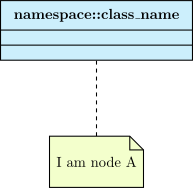
In TikZ-UML, the element name is used as name of the TikZ node. For some of them, you may want to use special characters, such as underscore (_), or double dots (:). The internal mechanism of TikZ-UML forbids backslashes and double dots in the name of a TikZ node. As far as double dots are concerned, string substitutions are done on the element name to define the node name. But for _, it does not work so easily. That is why you can directly name a node with the option name. Here is an example concerning a class:
\umlemptyclass[name=A]{namespace::class\_name}
\umlnote[below=2cm of A]{A}{I am node A}
Naming a relationship#
In order to understand the purpose of giving a name to a relationship, one should explain how arrows are defined.
To build an arrow, we need to define control nodes, and a name for each one. The only way to identify a relationship is to give a name using an ID counter. This counter is incremented each time we define a relationship in a picture.
Let’s suppose the relationship has the ID <i>. The name of the relationship, called relname in the following, is: relation-<i>
This default behavior is not easy to use, because the value of the counter is not defined by the user, and depends on the order of definition of the relationships in the picture. This is the reason why you can define relname thanks to the name option. In the two following sections, you will see when this option is useful.
According to the geometry option, there are 3 cases:
-
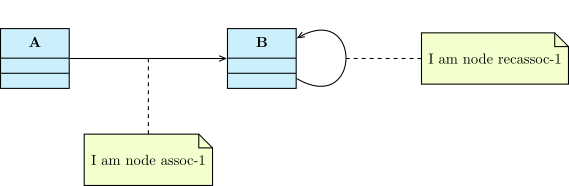
If the arrow is a straight line or a recursive line, it is renamed in relname-1.
\umlemptyclass{A}
\umlemptyclass[x=6]{B}
\umluniassociate[name=assoc]{A}{B}
\umluniassociate[name=recassoc, loopsize=2cm]{B}{B}
\umlnote[below=2cm of assoc-1]{assoc-1}{I am node assoc-1}
\umlnote[right=2cm of recassoc-1]{recassoc-1}{I am node recassoc-1}
-
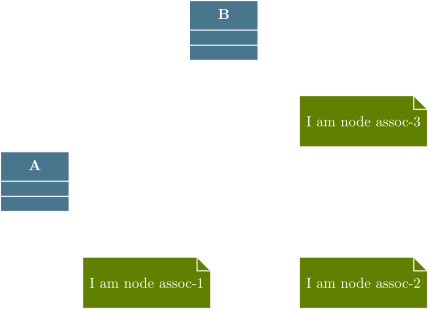
If the arrow has one right angle, the node placed at the angle is named relname-2, that is enough to draw the arrow. 2 other nodes are defined, placed at the middle of each arc and named respectively relname-1 and relname-3.
\umlemptyclass{A}
\umlemptyclass[x=5, y=4]{B}
\umluniassociate[name=assoc, geometry=-|]{A}{B}
\umlnote[below=2cm of assoc-1]{assoc-1}{I am node assoc-1}
\umlnote[below right=2cm and 2cm of assoc-2]{assoc-2}{I am node assoc-2}
\umlnote[right=2cm of assoc-3]{assoc-3}{I am node assoc-3}

-
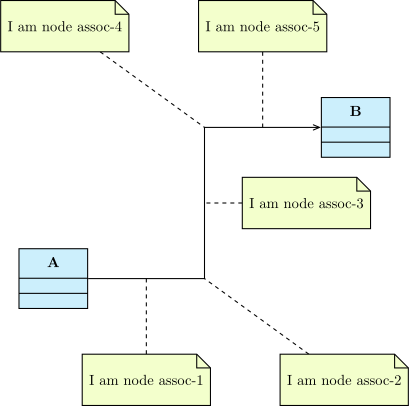
If the arrow has 2 right angles, they are defined with relname-middle, that is enough to draw the arrow. Nodes placed at the angles are named respectively relname-2 and relname-4. 3 other nodes are defined, at the middle of each arc, named respectively relname-1, relname-3, and relname-5.
\umlemptyclass{A}
\umlemptyclass[x=8, y=4]{B}
\umluniassociate[name=assoc, geometry=-|-]{A}{B}
\umlnote[below=2cm of assoc-1]{assoc-1}{I am node assoc-1}
\umlnote[below right=2cm and 2cm of assoc-2]{assoc-2}{I am node assoc-2}
\umlnote[right=1cm of assoc-3]{assoc-3}{I am node assoc-3}
\umlnote[above left=2cm and 2cm of assoc-4]{assoc-4}{I am node assoc-4}
\umlnote[above=2cm of assoc-5]{assoc-5}{I am node assoc-5}