Geometry of a relationship#
The shape of a relationship#
As you may have seen in previous examples, you can specify the geometric shape of a relationship
with the geometry option. It needs a value among the following list: - - (straight line), -| (horizontal then vertical), |- (vertical then horizontal), -|- (horizontal chicane) or |-| (vertical chicane). These values are very inspired from TikZ-UML philosophy.
It seems that this option is used very often. That is why a shortcut of the \umlrelationship command has been defined each possible value of the geometry option:
\umlHVrelationship-
shortcut of
\umlrelationshipwithgeometry = -| \umlVHrelationship-
shortcut of
\umlrelationshipwithgeometry = |- \umlHVHrelationship-
shortcut of
\umlrelationshipwithgeometry = -|- \umlVHVrelationship-
shortcut of
\umlrelationshipwithgeometry = |-|
Warning
For each of these 4 shortcuts, the geometry option is forbidden.
Note
There is no shortcut for the value - -: this is the default value for the \umlrelationship command.
To adjust the geometry of a relationship#
When the geometry is built with 2 segments, you can define the coordinates of the auto-built point, named control node.
Then, instead of using \umlrelationship, you should use the \umlCNrelationship command, or one of its 12 shortcuts:
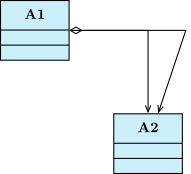
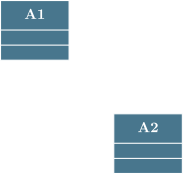
\umlemptyclass{A1}
\umlemptyclass[x=3,y=-3]{A2}
\umluniaggregate[geometry=-|]{A1}{A2}
\umlCNuniassociate{A1}{4,0}{A2}
When the geometry is built with 3 segments, the relative position of the middle segment between classes is defined by the middle of the classes nodes. You can adjust this parameter with the weight option:
\umlemptyclass{A1}
\umlemptyclass[x=4, y=-1]{A2}
\umlemptyclass[y=-2]{A3}
\umlassociate[geometry=-|-]{A1}{A2}
\umluniaggregate[geometry=-|-, weight=0.3]{A3}{A2}
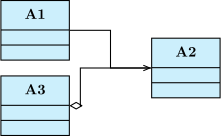
In some cases, this option is not very convenient, because it needs to compute the option value to give.
There is another possibility by using the arm1 and arm2 options, that control the size
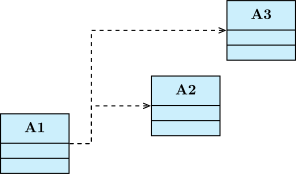
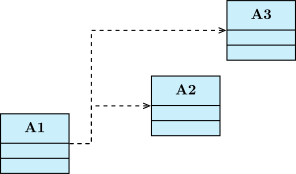
of the first and last segment respectively. Let’s see the 2 following examples using respectively the weight option and the arm1 option:
\umlemptyclass{A1}
\umlemptyclass[x=4, y=1]{A2}
\umlemptyclass[x=6, y=3]{A3}

\umlHVHdep[weight=0.375]{A1}{A2}
\umlHVHdep[weight=0.25]{A1}{A3}
\umlemptyclass{A1}
\umlemptyclass[x=4, y=1]{A2}
\umlemptyclass[x=6, y=3]{A3}

\umlHVHdep[arm1=1.5cm]{A1}{A2}
\umlHVHdep[arm1=1.5cm]{A1}{A3}
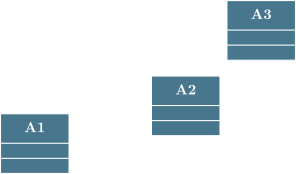
The arm1 and arm2 options also take negative values. How does it work then ?
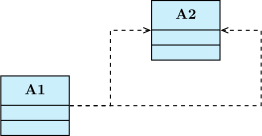
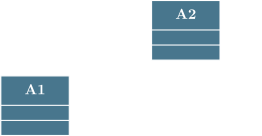
A positive value means an arm oriented to the right direction (to the right or to the top), whereas a negative value means an arm oriented to the opposite direction, that allows you to draw other 3-segments relationships:
\umlemptyclass{A1}
\umlemptyclass[x=4, y=2]{A2}

\umlHVHdep[arm2=-2cm]{A1}{A2}
\umlHVHdep[arm2=2cm]{A1}{A2}
To modify the anchor points of a relationship#
The default behavior of a relationship is to start from the center anchor of the source class node and to end to the center anchor of the target class node.
You can adjust this with the options anchor1 and hypertarget{anchor2}{anchor2}:
\umlemptyclass{A}
\umlemptyclass[x=4,y=2]{B}
\umldepend[geometry=-|]{A}{B}
\umlassociate[geometry=-|, anchor1=30, anchor2=300, name=assoc1]{A}{B}
\umlassociate[geometry=-|, anchor1=-30, anchor2=-60, name=assoc2]{A}{B}
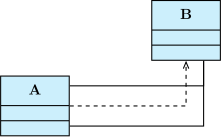
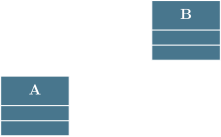
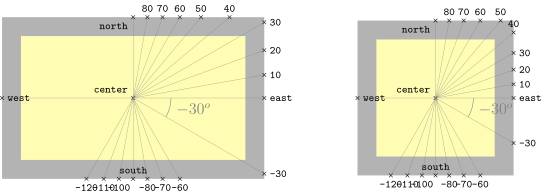
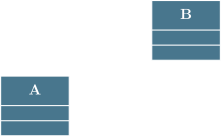
You give angular values in degree and they can be negative. The internal mechanism of TikZ-UML uses moduli. The value 0 is east, 90 is north, 180 (or -180) is west, et 270 (or -90) is south. The following figure illustrates this option and its angular meaning on 2 examples of rectangular nodes, (class nodes for instance). You can notice that border anchors (to use TikZ-UML vocabulary) depend on node dimensions.
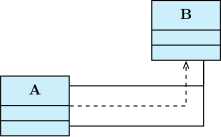
You will very often define anchor1 and anchor2 simultaneously. In this case, you can use the all-in-one option anchors:
\umlemptyclass{A}
\umlemptyclass[x=4,y=2]{B}
\umldep[geometry=-|]{A}{B}
\umlassociate[geometry=-|, anchors=30 and 300, name=assoc1]{A}{B}
\umlassociate[geometry=-|, anchors=-30 and -60, name=assoc2]{A}{B}
To define a recursive relationship#
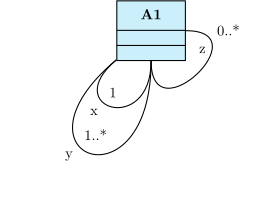
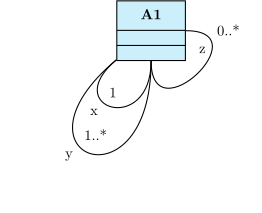
You can define recursive relationships, namely a relationship from a class to itself. Then, the
geometry option is disabled, but 3 specific options are available: angle1 determines
the start angle, angle2 determines the end angle, and loopsize controls the size of the loop:
\umlemptyclass{A1}
\umlassociate[arg=x, mult=1, pos=0.6, angle1=-90, angle2=-140, loopsize=2cm]{A1}{A1}
\umlassociate[arg=y, mult=1..*, pos=0.6, angle1=-90, angle2=-140, loopsize=4cm]{A1}{A1}
\umlassociate[arg=z, mult=0..*, pos=0.8, angle1=-90, angle2=0, loopsize=2cm]{A1}{A1}
When you use recursive relationships, you will notice that you will need the 3 options simultaneously. This is the reason why a compact form is defined, the recursive option, and the following syntax:
\umlemptyclass{A1}
\umlassociate[arg=x, mult=1, pos=0.6, recursive=-90|-140|2cm]{A1}{A1}
\umlassociate[arg=y, mult=1..*, pos=0.6, recursive=-90|-140|4cm]{A1}{A1}
\umlassociate[arg=z, mult=0..*, pos=0.8, recursive=-90|0|2cm]{A1}{A1}