Attributes of a relationship#
Attribute name and multiplicity#
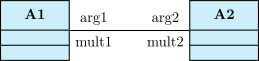
A relationship means a dependency between two classes and represents an attribute in most of the cases. You can define its name with the arg1 option or the arg2 option, and its multiplicity with the mult1 option or the mult2 option:
\umlemptyclass{A1}
\umlemptyclass[x=5]{A2}
\umlassociate[arg1=arg1, mult1=mult1, arg2=arg2, mult2=mult2]{A1}{A2}
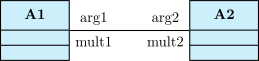
For unidirectional relationships, you should use only arg2 and mult2 options. That is why shortcuts have been defined, namely the arg option and the mult option respectively.
In addition, when you define the name and the multiplicity of an attribute, you may prefer use the all-in-one following options attr1, attr2 and attr:
\umlemptyclass{A1}
\umlemptyclass[x=5]{A2}
\umlassociate[attr1=arg1|mult1, attr2=arg2|mult2]{A1}{A2}
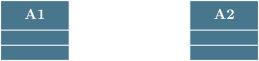
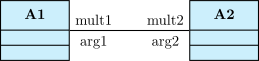
This has an advantage: the semantic of the two values has disappeared and you can switch them for convenience:
\umlemptyclass{A1}
\umlemptyclass[x=5]{A2}
\umlassociate[attr1=mult1|arg1, attr2=mult2|arg2]{A1}{A2}
Positioning information on attributes#
You can place information seen in previous section with the following options: pos1, pos2 and pos.
The \umlrelationship command determine by itself if name and multiplicity should be written on left and right or on top and bottom of the arrow, according to the geometry and their placement. For those who know TikZ-UML enough, the mechanism is based on auto and swap options:
\umlemptyclass{A1}
\umlemptyclass[x=2, y=-2]{A2}
\umlemptyclass[x=-2, y=-2.5]{A3}
\umlassociate[geometry=-|, arg1=x, mult1=1, pos1=0.2, arg2=y, mult2=*, pos2=1.9]{A1}{A2}
\umlassociate[geometry=|-|, arg1=a, mult1=1, pos1=0.5, arg2=b, mult2=*, pos2=1.5]{A1}{A3}
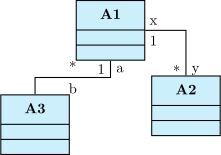
You may have noticed that the range of values of the position depends on the number of segments composing the arrow. For a straight line, position has to be between 0 (source class) and 1 (target class). If there are 2 segments, then position has to be between 0 et 2 (target class), the value 1 corresponding to the control node. Otherwise, position has to be between 0 et 3, values 1 and 2 corresponding to the first and second control node respectively.
Aligning information on attributes#
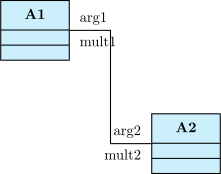
Name and multiplicity of an attribute, when they are written on top and bottom of the relationship, are centered by default. You can define another alignment.
The options align1, align2 and align are used to have ragged right or ragged left text:
\umlemptyclass{A1}
\umlemptyclass[x=4, y=-3]{A2}
\umlassociate[geometry=-|-, arg1=arg1, mult1=mult1, pos1=0.1, align1=left, arg2=arg2, mult2=mult2, pos2=2.9, align2=right]{A1}{A2}
Stereotype of a relationship#
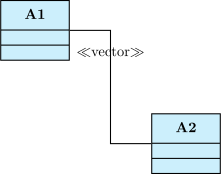
The stereotype of a relationship is a keyword contained between \(\ll\) and \(\gg\).
You can define it with the option stereo and place it with the option pos stereo:
\umlemptyclass{A1}
\umlemptyclass[x=4, y=-3]{A2}
\umlassociate[geometry=-|-, stereo=vector, pos stereo=1.2]{A1}{A2}