Definition of relationships#
A relationship between UML elements is the second category of elements constituting a UML diagram, connecting UML elements. The first section will be dedicated to describing them. The second section will describe the common settings, generally available for every of these relationships. For more specific information about these relationships, please refer to the documentation of the corresponding UML diagram.
The \umlrelationship command#
Each UML element is drawn as a node (or a set of nodes) with a specific name, you can access to and use. To define a relationship between two elements, you just need to specify the source element name, the target element name and a set of options specific to the relationship you want to draw. The syntax is the following:
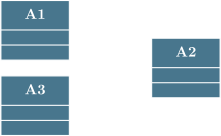
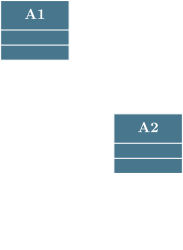
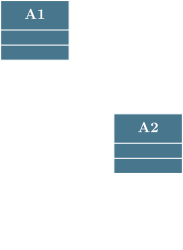
\umlemptyclass{A1}
\umlemptyclass[x=3, y=-3]{A2}
\umlrelationship[type=unidirectional aggregation, arg2=a, mult2=1, pos2=0.9]{A1}{A2}
\umlrelationship[type=unidirectional association, geometry=-|, arg1=x, mult1=1, pos1=1.9, arg2=y, mult2=*, pos2=0.2]{A1}{A2}
\umlrelationship[type=unidirectional composition, arg=z, mult=1..*, pos=0.8, angle1=-90, angle2=-140, loopsize=2cm]{A2}{A2}
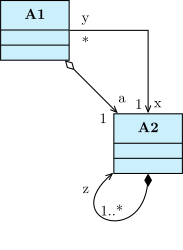
First, the key type allows you to specify the type of relationship you want to draw. See next section to known what is available.
Next, there is a subset of keys related to the geometry of the relationship, see Geometry of a relationship for more details.
At last, there is a subset of keys related to attributes information, see Attributes of a relationship for more details.
The different relationships#
From a UML semantic point of view, there are 12 different relationships. Every type of relation is defined in TikZ-UML:
An association#
An association is a relationship between two UML elements, showing that they are connected in some way. It is the most general relationship, and it can be used to represent many different types of relationships between UML elements. For instance, it can be used to represent a relationship between two classes in a class diagram, or a relationship between two objects in an object diagram, or a relationship between an actor and a use case in a use case diagram, etc. FOr this purpose, you can use the \umlassociate command:
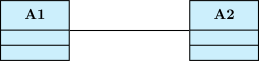
An association can be:
-
unidirectional/directed: You can use the
\umluniassociatecommand: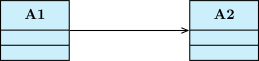
-
bidirectional: You can use the
\umlbiassociatecommand: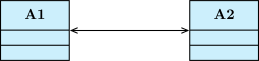
A dependency#
A dependency is used to show that some UML elements depend on other UML elements. In this case, you can use the \umldepend command:
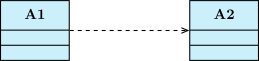
A dependency can be more specific. To set the additional information, you can use key stereo, but some of them are pre-defined. The following cases are the most common types of dependencies:
-
A friendship: The friendship is a dependency between two classes, showing that one class can access to the private part of the other class. To do so, you can use the
\umlfriendcommand: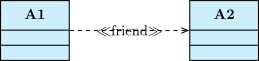
-
A binding: The binding is a dependency between a class and a template class, showing that class types are defined for the template parameter of the template class. To do so, you can use the
\umlbindcommand: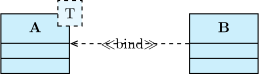
-
A usage: The usage is a dependency between two UML elemennts, showing that one element requires the other one. To do so, you can use the
\umlusecommand: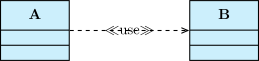
-
An inclusion: The inclusion is a dependency between two use cases, showing that one use case includes the behavior of another use case. To do so, you can use the
\umlincludecommand:

-
An extension: The extension is a dependency between two use cases, showing that one use case extends the behavior of another use case. To do so, you can use the
\umlextendcommand:

An aggregation#
An aggregation is an association between two UML elements, showing that one element is a part of another element. To do so, you can use the \umlaggregate command:
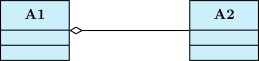
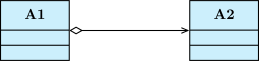
An aggregation can be unidirectional: in this case, you can use the \umluniaggregate command:
A composition#
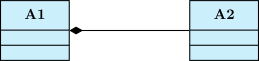
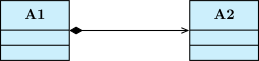
A composition is an aggregation between two UML elements, showing that not only one element is a part of another element, but also that this part cannot exist without the whole. To do so, you can use the \umlcompose command:
A composition can be unidirectional: in this case, you can use the \umlunicompose command:
An import#
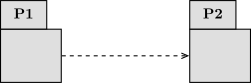
An import is a dependency between two UML packages. In this case, you can use the \umlimport command:
An inheritance/A generalization#
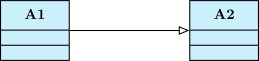
An inheritance is a association between two UML elements, showing that one element is a specialization of another element. For instance, there can be inheritance between classes, actors, etc. To do so, you can use the \umlinherit (or \umlgeneralize) command:
A nesting#
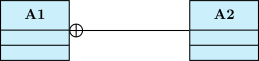
A nesting is a relationship between two UML elements, showing that one element is nested inside another element. It is a particular case of association. For instance, there can be nesting between classes and packages, etc. To do so, you can use the \umlnest command:
An implementation/realization#
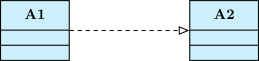
An implementation (or a realization) is a dependency between two UML elements, showing that one element is an implementation of an interface element. To do so, you can use the \umlimplement (or \umlrealize) command:
A transition#
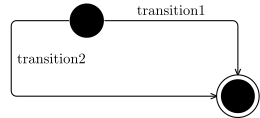
A transition is a relationship between two states in a state diagram. It can be defined with the \umltransition command. This is a standard relationship, but when transition arrow is drawn with several “segments” (see Geometry of a relationship), corners are rounded.

An assembly connector#
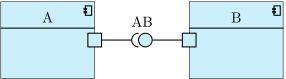
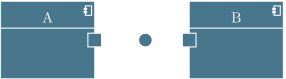
An assembly connector is a relationship between two components in a component diagram, showing that one component is connected to another component. To do so, you can use the \umlassemblyconnector command:
A delegation#
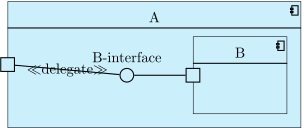
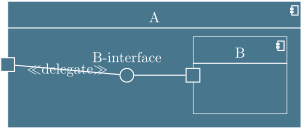
A delegation is a relationship between two components in a component diagram, showing that one component delegates some of its behavior to another component. To do so, you can use the \umldelegate command:
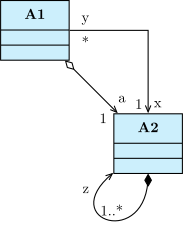
As a result, here is the best way to define relationships in TikZ-UML, by using the appropriate commands:
\umlemptyclass{A1}
\umlemptyclass[x=3, y=-3]{A2}
\umluniaggregate[arg2=a, mult2=1, pos2=0.9]{A1}{A2}
\umluniassociate[geometry=-|, arg1=x, mult1=1, pos1=1.9, arg2=y, mult2=*, pos2=0.2]{A1}{A2}
\umlunicompose[arg=z, mult=1..*, pos=0.8, angle1=-90, angle2=-140, loopsize=2cm]{A2}{A2}
Intersection point of relationships#
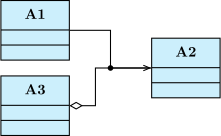
When you draw a diagram, it occurs that relationships cross other ones or share arcs. Let’s take two crossing arrows.
Can both start points go graphically to both end points ? If yes, you will want to draw a point at the intersection of the arrows, and this point should be a control node of one the relationships. To define the point, you can use the \umlpoint command:
\umlemptyclass{A1}
\umlemptyclass[x=4, y=-1]{A2}
\umlemptyclass[y=-2]{A3}
\umlassociate[geometry=-|-, name=assoc]{A1}{A2}
\umluniaggregate[geometry=-|-, weight=0.4]{A3}{A2}
\umlpoint{assoc-4}