Global styles#
The \tikzumlset command#
Thanks to the \tikzumlset command, you can change default preferences for elements and relationships. The available options are:
General keys#
font-
allows you to define the default font style for every drawn element (=\small by default),
x-
allows you to set the default first coordinate (=0 by default),
y-
allows you to set the default second coordinate (=0 by default),
draw-
allows you to define default edge color for every drawn element (auto by default),
fill-
allows you to define default background color for every drawn element (auto by default),
text-
allows you to set default text color for every drawn element (auto by default),
Setting draw, fill and text keys are equivalent to setting every specific draw, fill or text key.
Specific keys#
For umlpackage#
package draw-
allows you to define the default border color of a package (=black by default),
package fill-
allows you to define the default background color of a package (=blue!20 by default),
package text-
allows you to define the default text color of a package (=black by default),
package stereotype-
allows you to set the default package stereotype (=empty by default)
For \umlclass#
class draw-
allows you to define the default border color of a class node (=black by default),
class fill-
allows you to define the default background color of a class node (=yellow!20 by default),
class text-
allows you to define the default text color of a class node (=black by default),
class width-
allows you to set the default class width (=10ex by default)
simple interface width-
allows you to set the default width of a simple interface (=4ex by default),
class type-
allows you to set the default class type (=class by default),
class template fill-
allows you to define the default background color of a template node (=yellow!2 by default),
For \umlNarynode#
narynode draw-
allows you to define the default border color of a n-ary node (=black by default),
narynode fill-
allows you to define the default background color of a n-ary node (=yellow!20 by default),
narynode text-
allows you to define the default text color of a n-ary node (=black by default),
narynode width-
allows you to set the default n-ary node width (=6ex by default)
For \umlrelationship#
relationship draw-
allows you to define the default border color of a relationship (=black by default),
relationship fill-
allows you to define the default background color of a relationship (=black by default),
relationship text-
allows you to define the default text color of a relationship (=black by default),
relationship geometry-
allows you to set the default geometry of a relationship (=– by default)
relationship angle1-
allows you to set the default start angle of a relationship (=-30 by default)
relationship angle2-
allows you to set the default end angle of a relationship (=30 by default)
relationship loopsize-
allows you to set the default loop size of a relationship (=3em by default)
relationship weight-
allows you to set the default weight of a relationship (=0.5 by default)
relationship pos1-
allows you to set the default position of first attribute of a relationship (=0.2 by default)
relationship pos2-
allows you to set the default position of second attribute of a relationship (=0.8 by default)
relationship pos stereo-
allows you to set the default position of the stereotype of a relationship (=0.5 by default)
For \umlnote#
note draw-
allows you to define the default border color for a note (=black by default),
note fill-
allows you to define the default background color for a note (=green!20 by default),
note text-
allows you to define the default text color for a note (=black by default),
note width-
allows you to set the default note width (auto by default)
For umlsystem#
system draw-
allows you to define the default border color for a system (=black by default),
system fill-
allows you to define the default background color for a system (=red!20 by default),
system text-
allows you to define the default text color for a system (=black by default),
For \umlusecase#
usecase draw-
allows you to define the default border color for a use case (=black by default),
usecase fill-
allows you to define the default background color for a use case (=blue!20 by default),
usecase text-
allows you to define the default text color for a use case (=black by default),
For \umlactor#
actor draw-
allows you to define the default border color for a use case (=black by default),
actor text-
allows you to define the default text color for a use case (=black by default),
actor below-
allows to set the space between actor symbol and text (=0.5cm by default)
For umlstate#
state draw-
allows you to define the default border color for a state (=black by default),
state fill-
allows you to define the default border color for a state (=yellow!20 by default),
state text-
allows you to define the default text color for a state (=black by default),
state double color-
allows you to define the default double color for a final pseudo-state (=white by default),
state width-
allows you to set the default width of a state (=8ex by default),
state join width-
allows you to define the default width of a joint pseudo-state (=3ex by default),
state decision width-
allows you to define the default width of a decision pseudo-state (=3ex by default),
state initial width-
allows you to define the default width of an initial pseudo-state (=5ex by default),
state final width-
allows you to define the default width of a final pseudo-state (=5.5ex by default),
state enter width-
allows you to define the default width of an enter pseudo-state (=5ex by default),
state exit width-
allows you to define the default width of an exit pseudo-state (=5ex by default),
state end width-
allows you to define the default width of an end pseudo-state (=5ex by default),
state history width-
allows you to define the default width of a history pseudo-state (=5ex by default),
state deep history width-
allows you to define the default width of a deep history pseudo-state (=5ex by default),
state width-
allows you to set the default width of a state (=8ex by default),
For \umlobject#
object draw-
allows you to define the default border color for an object (=black by default),
object fill-
allows you to define the default background color for an object (=yellow!20 by default),
object text-
allows you to define the default text color for an object (=black by default),
object stereo-
allows you to define the default stereo color for an object (=object by default),
For umlcall#
call draw-
allows you to define the default border color for a call (=black by default),
call fill-
allows you to define the default background color for a call (=white by default),
call text-
allows you to define the default text color for a call (=black by default),
call dt-
allows you to define the default latency time for a call (auto by default),
call padding-
allows you to define the default padding for a call (=2 by default),
call type-
allows you to define the default type for a call (=synchron by default),
For umlfragment#
fragment draw-
allows you to define the default border color for a fragment (=black by default),
fragment fill-
allows you to define the default background color for a fragment (=none by default),
fragment text-
allows you to define the default text color for a fragment (=black by default),
fragment type-
allows you to define the default type for a fragment (=opt by default),
fragment inner xsep-
allows you to define the default horizontal inner separation for a fragment (=1 by default),
fragment inner ysep-
allows you to define the default vertical inner separation for a fragment (=1 by default),
For umlconstructorcall#
constructor call dt-
allows you to define the default latency time for a constructor call (=4 by default),
For \umlcomponent#
component draw-
allows you to define the default border color for a component (=black by default),
component fill-
allows you to define the default background color for a component (=yellow!20 by default),
component text-
allows you to define the default text color for a component (=black by default),
component width-
allows you to define the default width for a component (=8ex by default),
For \umlrequiredinterface#
required interface draw-
allows you to define the default border color for a required interface (=black by default),
required interface fill-
allows you to define the default background color for a required interface (=yellow!20 by default),
required interface text-
allows you to define the default text color for a required interface (=black by default),
required interface distance-
allows you to define the default distance between the component and the interface for a required interface (=2.5cm by default),
required interface width-
allows you to define the default width for a required interface (=2ex by default),
required interface padding-
allows you to define the default padding for a required interface (=1cm by default),
For \umlprovidedinterface#
provided interface draw-
allows you to define the default border color for a provided interface (=black by default),
provided interface fill-
allows you to define the default background color for a provided interface (=yellow!20 by default),
provided interface text-
allows you to define the default text color for a provided interface (=black by default),
provided interface distance-
allows you to define the default distance between the component and the interface for a provided interface (=3cm by default),
provided interface width-
allows you to define the default width for a provided interface (=2ex by default),
provided interface padding-
allows you to define the default padding for a provided interface (=1cm by default),
For \umlport#
port draw-
allows you to define the default border color for a port (=black by default),
port fill-
allows you to define the default background color for a port (=yellow!20 by default),
port text-
allows you to define the default text color for a port (=black by default),
port width-
allows you to define the default width for a port (=2ex by default),
For \umlassemblyconnector#
assembly connector draw-
allows you to define the default border color for an assembly connector (=black by default),
assembly connector fill-
allows you to define the default background color for an assembly connector (=yellow!20 by default),
assembly connector text-
allows you to define the default text color for an assembly connector (=black by default),
assembly connector port fill-
allows you to define the default background color for the port of an assembly connector (=yellow!20 by default),
assembly connector width-
allows you to define the default width for an assembly connector (=2ex by default),
Example of use#
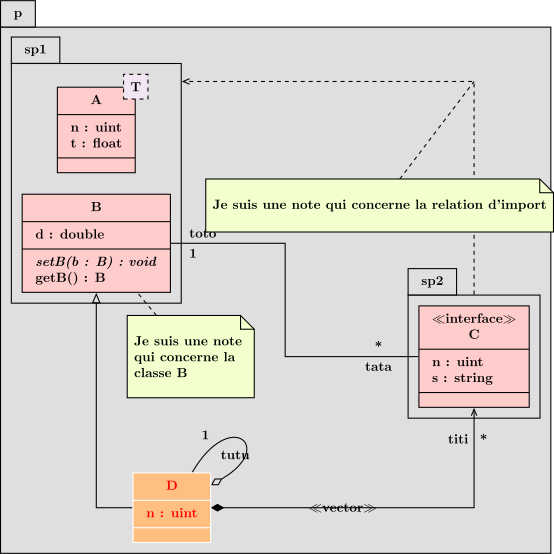
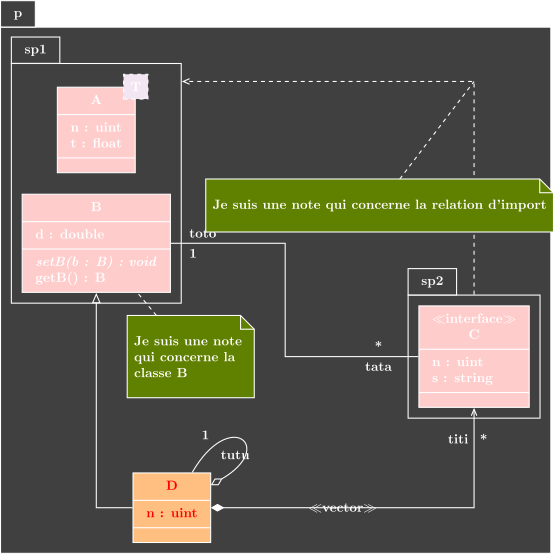
We illustrate the use of the \tikzumlset command by changing colors associated to class and font.
We can also change colors of a given class with draw, text and fill options.
\tikzumlset{class fill=red!20, class template fill=violet!10, font=\bfseries\footnotesize}
\begin{tikzpicture}
...
\umlclass[x=2,y=-11, fill=orange!50, draw=white, text=red]{D}{
n: uint
}{}
...
\end{tikzpicture}
(Re)defining relationship styles#
Relationship commands have key type setting the TikZ style name to use for the relationship. By default, it is set to association for every relationship. Let’s see the definition of the \umlinherit command:
\tikzstyle{tikzuml inheritance}=[color=\tikzumlRelationshipDefaultDrawColor, -open triangle 45]%
\tikzstyle{tikzuml inheritance start}=[color=\tikzumlRelationshipDefaultDrawColor, -]%
\tikzstyle{tikzuml inheritance middle}=[color=\tikzumlRelationshipDefaultDrawColor, -, dashed]%
\tikzstyle{tikzuml inheritance end}=[color=\tikzumlRelationshipDefaultDrawColor, -open triangle 45]%
...%
\newcommand{\umlinherit}[3][]{\umlrelation[type=inheritance, #1]{#2}{#3}}%
You can easily define a command on this model by defining a particular style.